

Explore optional advanced configuration options to enhance your Velt implementation with locations, contacts, and initialization state detection.
Locations
Users logged into the same Document ID can see each other’s Presence, Cursors, Comments etc.
However, if you want to add another layer of categorization to organize users together, you can use Location .
If a Document is like a house, a Location is like a room within the house.
To learn more about Locations, check out its dedicated section here .
When you reply to a comment, you can @mention other teammates that are added to a User's Contacts List.
To learn more about creating a User's Contacts List, read here .
JWT Authentication Tokens
For enhanced security, you can use JWT tokens to authenticate users instead of passing user data directly in the client-side code. This provides an additional layer of security by verifying user identity on the server side.
Access control roles (Editor/Viewer): You can assign a user’s role per resource (organization, folder, document) in the token permissions or via backend access APIs. Editors can create/edit collaboration data (e.g., comments); Viewers are read-only. See Access Control , Generate Token , Add Permissions , and Add/Update Users .
Critical JWT Token Requirements:
JWT tokens must be generated server-side using your auth token from the Velt Console
Never expose JWT tokens or auth tokens in client-side code
Tokens expire after 48 hours and need to be refreshed
Include the JWT token in the authToken field when calling identify()
Step 1: Enable JWT Tokens in Console
First, enable JWT tokens in your Velt Console:
Go to console.velt.dev
Enable the toggle for Require JWT Token (listed at the bottom of the page)
JWT tokens won’t work unless you enable this setting in your console.
Step 2: Generate Auth Token
You need an auth token to generate JWT tokens. You can generate this from the Auth Token section in your Velt Console dashboard.
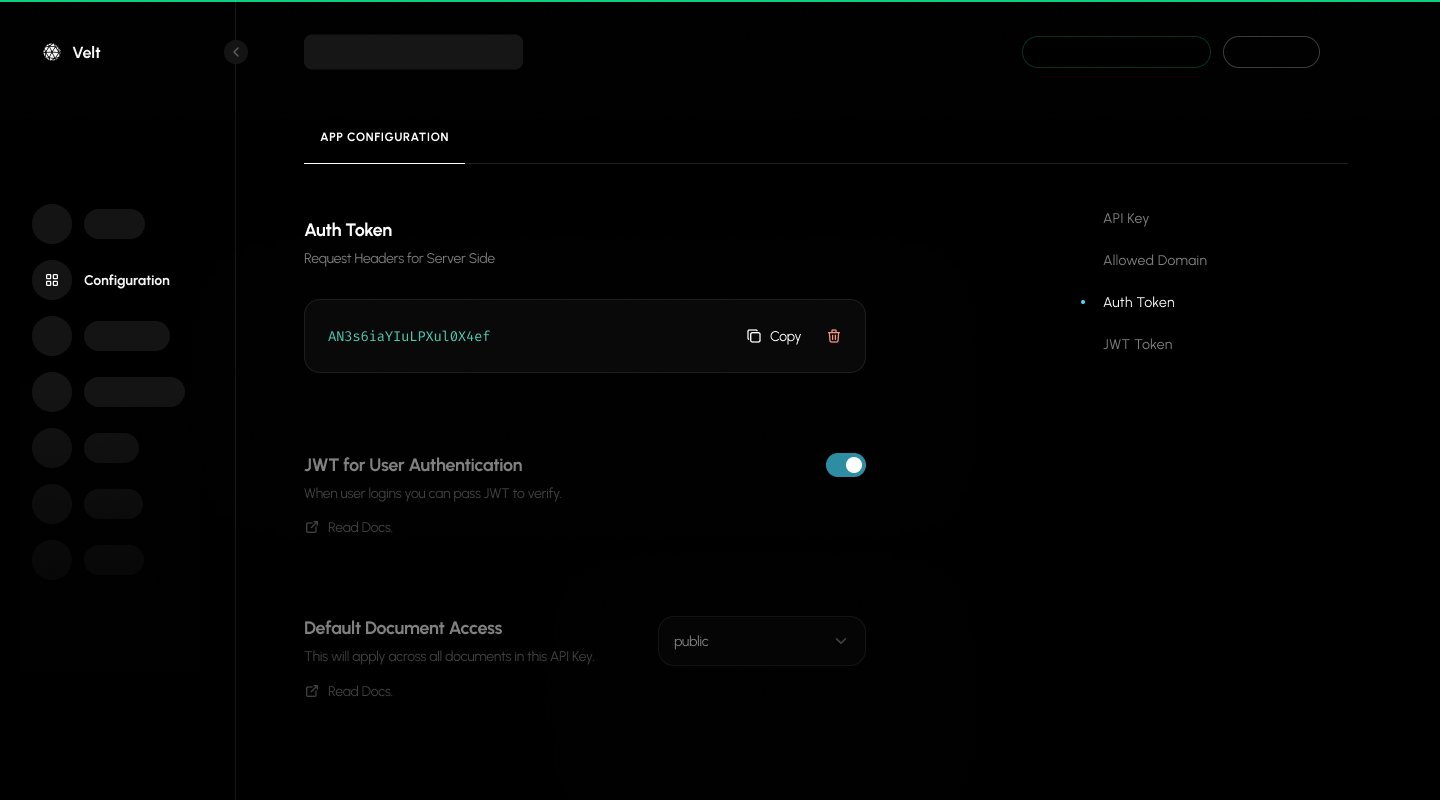
Store auth tokens securely on your server-side environment and never expose them in client-side code.
Auth tokens are long-lived and should be rotated periodically for security best practices.
Step 3: Create Server Endpoint for JWT Token Generation
Create a server endpoint that generates and serves JWT tokens to your client.
See our generate_token API call for more information.
Node.js Server Endpoint
Python Server Endpoint
Ruby Server Endpoint
PHP Server Endpoint
const express = require ( 'express' );
const app = express ();
const PORT = 8080 ;
// Your credentials from Velt Console
const VELT_API_KEY = "YOUR_VELT_API_KEY" ;
const VELT_AUTH_TOKEN = "your-generated-auth-token-from-console" ;
async function generateVeltJWTToken ( userId , config = {}) {
const url = "https://api.velt.dev/v2/auth/generate_token" ;
// Note: the request body must be wrapped in a top-level `data` object.
// `organizationId` belongs in `permissions.resources[]`, not in `userProperties`.
const body = {
data: {
userId: userId ,
userProperties: {
name: config . name ,
email: config . email ,
isAdmin: config . isAdmin || false
},
permissions: config . organizationId
? {
resources: [
{ type: "organization" , id: config . organizationId }
]
}
: undefined
}
};
try {
const response = await fetch ( url , {
method: "POST" ,
headers: {
"Content-Type" : "application/json" ,
"x-velt-api-key" : VELT_API_KEY ,
"x-velt-auth-token" : VELT_AUTH_TOKEN
},
body: JSON . stringify ( body ),
});
if ( ! response . ok ) {
throw new Error ( `HTTP error! status: ${ response . status } ` );
}
const data = await response . json ();
return data ?. result ?. data ?. token ;
} catch ( error ) {
console . error ( "Error generating JWT token:" , error );
throw error ;
}
}
// Endpoint to generate JWT tokens
app . get ( '/generate-velt-jwt-token' , async ( req , res ) => {
try {
const { userId , organizationId , name , email , isAdmin } = req . query ;
const token = await generateVeltJWTToken ( userId , {
organizationId ,
name ,
email ,
isAdmin: isAdmin === 'true'
});
res . json ({ token });
} catch ( error ) {
res . status ( 500 ). json ({ error: 'Failed to generate token' });
}
});
app . listen ( PORT , () => {
console . log ( `JWT Server listening on port ${ PORT } ` );
});
See all 73 lines
from flask import Flask, request, jsonify
import requests
app = Flask( __name__ )
# Your credentials from Velt Console
VELT_AUTH_TOKEN = "your-generated-auth-token-from-console"
VELT_API_KEY = "YOUR_VELT_API_KEY"
def generate_velt_jwt_token ( user_id , config = None ):
url = "https://api.velt.dev/v2/auth/generate_token"
if config is None :
config = {}
# Note: the request body must be wrapped in a top-level `data` object.
# `organizationId` belongs in `permissions.resources[]`, not in `userProperties`.
data_payload = {
"userId" : user_id,
"userProperties" : {
"name" : config.get( "name" ),
"email" : config.get( "email" ),
"isAdmin" : config.get( "isAdmin" , False )
}
}
if config.get( "organizationId" ):
data_payload[ "permissions" ] = {
"resources" : [
{ "type" : "organization" , "id" : config.get( "organizationId" )}
]
}
body = { "data" : data_payload}
try :
response = requests.post(url, json = body, headers = {
"Content-Type" : "application/json" ,
"x-velt-api-key" : VELT_API_KEY ,
"x-velt-auth-token" : VELT_AUTH_TOKEN
})
response.raise_for_status()
data = response.json()
return data.get( "result" , {}).get( "data" , {}).get( "token" )
except Exception as error:
print ( f "Error generating JWT token: { error } " )
raise error
@app.route ( '/generate-velt-jwt-token' , methods = [ 'GET' ])
def get_jwt_token ():
try :
user_id = request.args.get( 'userId' )
organization_id = request.args.get( 'organizationId' )
name = request.args.get( 'name' )
email = request.args.get( 'email' )
is_admin = request.args.get( 'isAdmin' ) == 'true'
token = generate_velt_jwt_token(user_id, {
"organizationId" : organization_id,
"name" : name,
"email" : email,
"isAdmin" : is_admin
})
return jsonify({ "token" : token})
except Exception as error:
return jsonify({ "error" : "Failed to generate token" }), 500
if __name__ == '__main__' :
app.run( port = 8080 )
require 'sinatra'
require 'net/http'
require 'json'
# Your credentials from Velt Console
VELT_AUTH_TOKEN = "your-generated-auth-token-from-console"
VELT_API_KEY = "YOUR_VELT_API_KEY"
def generate_velt_jwt_token ( user_id , config = {})
url = URI ( "https://api.velt.dev/v2/auth/generate_token" )
# Note: the request body must be wrapped in a top-level `data` object.
# `organizationId` belongs in `permissions.resources[]`, not in `userProperties`.
data_payload = {
userId: user_id,
userProperties: {
name: config[ :name ],
email: config[ :email ],
isAdmin: config[ :isAdmin ] || false
}
}
if config[ :organizationId ]
data_payload[ :permissions ] = {
resources: [
{ type: 'organization' , id: config[ :organizationId ] }
]
}
end
body = { data: data_payload }
begin
http = Net :: HTTP . new (url. host , url. port )
http. use_ssl = true
request = Net :: HTTP :: Post . new (url)
request[ "Content-Type" ] = "application/json"
request[ "x-velt-api-key" ] = VELT_API_KEY
request[ "x-velt-auth-token" ] = VELT_AUTH_TOKEN
request. body = body. to_json
response = http. request (request)
unless response. is_a? ( Net :: HTTPSuccess )
raise "HTTP error! status: #{ response. code } "
end
data = JSON . parse (response. body )
data. dig ( "result" , "data" , "token" )
rescue => error
puts "Error generating JWT token: #{ error } "
raise error
end
end
get '/generate-velt-jwt-token' do
begin
user_id = params[ 'userId' ]
organization_id = params[ 'organizationId' ]
name = params[ 'name' ]
email = params[ 'email' ]
is_admin = params[ 'isAdmin' ] == 'true'
token = generate_velt_jwt_token (user_id, {
organizationId: organization_id,
name: name,
email: email,
isAdmin: is_admin
})
{ token: token }. to_json
rescue => error
status 500
{ error: "Failed to generate token" }. to_json
end
end
<? php
require 'vendor/autoload.php' ;
// Your credentials from Velt Console
$VELT_AUTH_TOKEN = "your-generated-auth-token-from-console" ;
$VELT_API_KEY = "YOUR_VELT_API_KEY" ;
function generateVeltJWTToken ( $userId , $config = []) {
$url = "https://api.velt.dev/v2/auth/generate_token" ;
// Note: the request body must be wrapped in a top-level `data` object.
// `organizationId` belongs in `permissions.resources[]`, not in `userProperties`.
$dataPayload = [
"userId" => $userId ,
"userProperties" => [
"name" => $config [ "name" ] ?? null ,
"email" => $config [ "email" ] ?? null ,
"isAdmin" => $config [ "isAdmin" ] ?? false
]
];
if ( ! empty ( $config [ "organizationId" ])) {
$dataPayload [ "permissions" ] = [
"resources" => [
[ "type" => "organization" , "id" => $config [ "organizationId" ]]
]
];
}
$body = [ "data" => $dataPayload ];
$ch = curl_init ( $url );
curl_setopt ( $ch , CURLOPT_RETURNTRANSFER , true );
curl_setopt ( $ch , CURLOPT_POST , true );
curl_setopt ( $ch , CURLOPT_POSTFIELDS , json_encode ( $body ));
curl_setopt ( $ch , CURLOPT_HTTPHEADER , [
'Content-Type: application/json' ,
'x-velt-api-key: ' . $VELT_API_KEY ,
'x-velt-auth-token: ' . $VELT_AUTH_TOKEN
]);
$response = curl_exec ( $ch );
$httpCode = curl_getinfo ( $ch , CURLINFO_HTTP_CODE );
if ( curl_errno ( $ch ) || $httpCode !== 200 ) {
throw new Exception ( "HTTP error! status: { $httpCode }" );
}
curl_close ( $ch );
$data = json_decode ( $response , true );
return $data [ "result" ][ "data" ][ "token" ] ?? null ;
}
if ( $_SERVER [ 'REQUEST_METHOD' ] === 'GET' && $_SERVER [ 'REQUEST_URI' ] === '/generate-velt-jwt-token' ) {
try {
$userId = $_GET [ 'userId' ] ?? null ;
$organizationId = $_GET [ 'organizationId' ] ?? null ;
$name = $_GET [ 'name' ] ?? null ;
$email = $_GET [ 'email' ] ?? null ;
$isAdmin = ( $_GET [ 'isAdmin' ] ?? 'false' ) === 'true' ;
$token = generateVeltJWTToken ( $userId , [
"organizationId" => $organizationId ,
"name" => $name ,
"email" => $email ,
"isAdmin" => $isAdmin
]);
header ( 'Content-Type: application/json' );
echo json_encode ([ "token" => $token ]);
} catch ( Exception $error ) {
http_response_code ( 500 );
echo json_encode ([ "error" => "Failed to generate token" ]);
}
}
?>
Token Refresh
JWT tokens expire after 48 hours from generation. Handle token expiration by subscribing to the error event and refreshing tokens when needed:
If you configured an Auth Provider on VeltProvider, token refresh is handled automatically. If you authenticate using the identify() method instead, you must listen for token_expired and re-authenticate with a fresh token as shown below.
React Token Refresh
Other Frameworks Token Refresh
import { useVeltEventCallback } from "@veltdev/react" ;
export default function AuthComponent () {
const errorEvent = useVeltEventCallback ( 'error' );
useEffect (() => {
if ( errorEvent ?. code === "token_expired" ) {
// Generate new JWT token from your server
fetch ( "/api/auth/refresh-token" )
. then ( res => res . json ())
. then ( data => {
// Re-authenticate with new token
useIdentify ( user , { authToken: data . newToken });
});
}
}, [ errorEvent ]);
return < div > Authentication Component </ div > ;
}
// Subscribe to error events to handle token expiration
client . on ( 'error' ). subscribe (( error ) => {
if ( error ?. code === "token_expired" ) {
// Generate new JWT token from your server
fetch ( "/api/auth/refresh-token" )
. then ( res => res . json ())
. then ( data => {
// Re-authenticate with new token
client . identify ( user , { authToken: data . newToken });
});
}
});
Security Benefits of JWT Tokens:
Server-side validation of user identity
Protection against client-side data manipulation
Secure user authentication without exposing sensitive data
Token expiration for enhanced security
Error Handling in Authentication
By default, authentication methods like identify() and setVeltAuthProvider() return null when authentication fails. You can configure these methods to throw errors instead by setting throwError: true in the options parameter.
When throwError is enabled, failed authentication attempts will throw an error that you can catch and handle, providing more control over error handling in your application.
React / Next.js
Other Frameworks
import { useIdentify , useVeltClient } from '@veltdev/react' ;
export default function AuthComponent ({ user }) {
const { client } = useVeltClient ();
// Using Promise-based approach
const handleAuthWithPromise = () => {
client . identify ( user , {
throwError: true , // Throws error if authentication fails
}). then (( authenticatedUser ) => {
// User is authenticated
console . log ( 'Authenticated:' , authenticatedUser );
}). catch (( err ) => {
// Handle authentication error
console . error ( 'Authentication failed:' , err );
});
};
// Using async/await approach
const handleAuthWithAsync = async () => {
try {
const authenticatedUser = await client . identify ( user , {
throwError: true , // Throws error if authentication fails
});
// User is authenticated
console . log ( 'Authenticated:' , authenticatedUser );
} catch ( err ) {
// Handle authentication error
console . error ( 'Authentication failed:' , err );
}
};
// Using setVeltAuthProvider
useEffect (() => {
if ( client ) {
client . setVeltAuthProvider ({
user ,
options: {
throwError: true , // Throws error if authentication fails
},
onError : ( err ) => {
// Handle authentication error
console . error ( 'Auth provider error:' , err );
}
});
}
}, [ client ]);
return < div > Authentication Component </ div > ;
}
< script >
async function authenticateUser () {
// Using Promise-based approach
Velt . identify ( user , {
throwError: true , // Throws error if authentication fails
}). then (( authenticatedUser ) => {
// User is authenticated
console . log ( 'Authenticated:' , authenticatedUser );
}). catch (( err ) => {
// Handle authentication error
console . error ( 'Authentication failed:' , err );
});
// Using async/await approach
try {
const authenticatedUser = await Velt . identify ( user , {
throwError: true , // Throws error if authentication fails
});
// User is authenticated
console . log ( 'Authenticated:' , authenticatedUser );
} catch ( err ) {
// Handle authentication error
console . error ( 'Authentication failed:' , err );
}
// Using setVeltAuthProvider
Velt . setVeltAuthProvider ({
user ,
options: {
throwError: true , // Throws error if authentication fails
},
onError : ( err ) => {
// Handle authentication error
console . error ( 'Auth provider error:' , err );
}
});
}
</ script >
Default value: false (returns null on authentication failure)
Set to true to receive errors that can be caught with .catch() or try/catch blocks
Useful for implementing custom error handling and recovery flows
Velt Client
Access the core Velt client instance to call SDK APIs and subscribe to core events.
Event Subscriptions
Event Description Event Object initUpdateInitialization lifecycle updates (documents/locations set/unset, user init) InitUpdateEvent userUpdateFired when the Velt user changes (login, logout, or update) UserUpdateEvent documentInitDocument initialization status changes DocumentInitEvent errorError events (e.g., token_expired) ErrorEvent veltButtonClickFired when a Velt Button is clicked VeltButtonClickEvent permissionProviderPermission Provider events for access requests, results, and errors PermissionProviderEvent dataProviderData Provider events for debugging get, save, and delete operations. Includes UserResolverEvent , CommentResolverEvent , AttachmentResolverEvent , ReactionResolverEvent DataProviderEvent
React / Next.js
Other Frameworks
import { useEffect } from 'react' ;
import { useVeltClient } from '@veltdev/react' ;
export default function CoreEventsListener () {
const { client } = useVeltClient ();
useEffect (() => {
if ( ! client ) return ;
// Listen to initialization updates
const initSub = client . on ( 'initUpdate' ). subscribe (( event ) => {
console . log ( 'Init update:' , event );
});
// Listen to token lifecycle errors (e.g., token_expired)
const errorSub = client . on ( 'error' ). subscribe (( error ) => {
console . log ( 'Velt error:' , error );
});
return () => {
initSub ?. unsubscribe ();
errorSub ?. unsubscribe ();
};
}, [ client ]);
return null ;
}
async function loadVelt () {
await Velt . init ( 'YOUR_VELT_API_KEY' );
const initSub = Velt . on ( 'initUpdate' ). subscribe (( event ) => {
console . log ( 'Init update:' , event );
});
const errorSub = Velt . on ( 'error' ). subscribe (( error ) => {
console . log ( 'Velt error:' , error );
});
// When done, unsubscribe
// initSub?.unsubscribe();
// errorSub?.unsubscribe();
}
Use the React hook useVeltClient() inside components rendered under VeltProvider.
The client is available after initialization. In HTML/vanilla, call Velt.init() first.
Always unsubscribe from event subscriptions to avoid memory leaks.
getVeltInitState()
This returns true when both the Velt User and Document are initialized.
React
Angular
Vue.js
HTML
React / Next.js with Hooks
React / Next.js (Non-hooks)
import { useVeltInitState } from '@veltdev/react' ;
export default function MyComponent () {
const veltInitState = useVeltInitState ();
useEffect (() => {
console . log ( 'Velt Init State:' , veltInitState );
if ( veltInitState ) {
// Velt state is initialized, so user can perform any action here
}
}, [ veltInitState ]);
return (
< div >
{ /* Your component content */ }
</ div >
);
}
import { useVeltClient } from '@veltdev/react' ;
export default function MyComponent () {
const { client } = useVeltClient ();
useEffect (() => {
if ( client ) {
const subscription = client . getVeltInitState (). subscribe (( veltInitState : boolean | undefined ) => {
console . log ( 'Velt Init State:' , veltInitState );
});
return () => subscription ?. unsubscribe ();
}
}, [ client ]);
return (
< div >
{ /* Your component content */ }
</ div >
);
}
Angular Initialization State
import { Component , OnInit , OnDestroy } from '@angular/core' ;
import { initVelt } from '@veltdev/client' ;
@ Component ({
selector: 'app-root' ,
template: `<div><!-- Your app content --></div>`
})
export class AppComponent implements OnInit , OnDestroy {
client : any ;
subscription : any ;
async ngOnInit () {
this . client = await initVelt ( 'YOUR_VELT_API_KEY' );
this . subscription = this . client . getVeltInitState (). subscribe (( veltInitState : boolean | undefined ) => {
console . log ( 'Velt Init State:' , veltInitState );
});
}
ngOnDestroy () {
this . subscription ?. unsubscribe ();
}
}
Vue.js Initialization State
import { initVelt } from '@veltdev/client' ;
export default {
name: 'App' ,
data () {
return {
client: null ,
subscription: null
}
} ,
async mounted () {
this . client = await initVelt ( 'YOUR_VELT_API_KEY' );
this . subscription = this . client . getVeltInitState (). subscribe (( veltInitState : boolean | undefined ) => {
console . log ( 'Velt Init State:' , veltInitState );
});
} ,
beforeUnmount () {
this . subscription ?. unsubscribe ();
}
}
HTML Initialization State
Complete HTML with Init State
// Subscribe to initialization state
let subscription = Velt . getVeltInitState (). subscribe (( veltInitState : boolean | undefined ) => {
console . log ( 'Velt Init State:' , veltInitState );
});
// To unsubscribe
subscription ?. unsubscribe ();
<! DOCTYPE html >
< html lang = "en" >
< head >
< meta charset = "UTF-8" >
< title > My App </ title >
< script type = "module" src = "https://cdn.velt.dev/lib/sdk@latest/velt.js" onload = " loadVelt ()" ></ script >
< script >
async function loadVelt () {
await Velt . init ( "YOUR_VELT_API_KEY" );
// Monitor initialization state
let subscription = Velt . getVeltInitState (). subscribe (( veltInitState ) => {
console . log ( 'Velt Init State:' , veltInitState );
if ( veltInitState ) {
// Velt is fully initialized
console . log ( 'Ready for collaborative features!' );
}
});
// Clean up subscription when needed
// subscription?.unsubscribe();
}
</ script >
</ head >
< body >
< h1 > My Collaborative App </ h1 >
< velt-comments ></ velt-comments >
<!-- Your app content -->
</ body >
</ html >
fetchDebugInfo()
Use this method to retrieve a one-time snapshot of essential debugging information about your Velt integration. This includes details like SDK version, API key, user, organizationId, documentId, folderId, version, and locations.
You can also access this diagnostic information through Velt’s Chrome DevTools extension .
Params: None
Returns: Promise<VeltDebugInfo>
React / Next.js
Other Frameworks
const { client } = useVeltClient ();
const handleFetchDebugInfo = async () => {
const debugInfo = await client . fetchDebugInfo ();
console . log ( 'Debug Info:' , debugInfo );
console . log ( 'SDK Version:' , debugInfo . veltVersion );
console . log ( 'API Key:' , debugInfo . apiKey );
console . log ( 'Server State:' , debugInfo . serverMap );
console . log ( 'Client State:' , debugInfo . clientMap );
};
const debugInfo = await Velt . fetchDebugInfo ();
console . log ( 'Debug Info:' , debugInfo );
console . log ( 'SDK Version:' , debugInfo . veltVersion );
console . log ( 'API Key:' , debugInfo . apiKey );
console . log ( 'Server State:' , debugInfo . serverMap );
console . log ( 'Client State:' , debugInfo . clientMap );
getDebugInfo()
Use this method to subscribe to real-time updates of debugging information about your Velt integration. This includes details like SDK version, API key, user, organizationId, documentId, folderId, version, and locations.
You can also access this diagnostic information through Velt’s Chrome DevTools extension .
Params: None
Returns: Observable<VeltDebugInfo>
React / Next.js
Other Frameworks
const { client } = useVeltClient ();
const [ debugInfo , setDebugInfo ] = useState ( null );
useEffect (() => {
if ( ! client ) return ;
const subscription = client . getDebugInfo (). subscribe (( info ) => {
setDebugInfo ( info );
console . log ( 'Debug Info Updated:' , info );
});
return () => subscription . unsubscribe ();
}, [ client ]);
const subscription = Velt . getDebugInfo (). subscribe (( debugInfo ) => {
console . log ( 'Debug Info Updated:' , debugInfo );
console . log ( 'SDK Version:' , debugInfo . veltVersion );
console . log ( 'API Key:' , debugInfo . apiKey );
console . log ( 'Server State:' , debugInfo . serverMap );
console . log ( 'Client State:' , debugInfo . clientMap );
});
// Unsubscribe when done
subscription . unsubscribe ();
disableLogs()
Control the verbosity of Velt SDK console logs. By default, the SDK outputs both informational logs and warnings. Use disableLogs() to suppress logs at different levels.
Call Effect disableLogs()Turns off warnings only disableLogs({ suppressAll: true })Turns off all logs disableLogs({ warning: false, suppressAll: true })Keeps warnings but turns off all other logs
React / Next.js
Other Frameworks
const { client } = useVeltClient ();
// Turn off warnings only
client . disableLogs ();
// Turn off all logs
client . disableLogs ({ suppressAll: true });
// Keep warnings but turn off all other logs
client . disableLogs ({ warning: false , suppressAll: true });
// Turn off warnings only
Velt . disableLogs ();
// Turn off all logs
Velt . disableLogs ({ suppressAll: true });
// Keep warnings but turn off all other logs
Velt . disableLogs ({ warning: false , suppressAll: true });
Set Custom Page Info
Attach your own page info (URL, title, path, etc.) to all newly created data (comments, reactions, recordings, presence, cursors). Opt-in; by default page info is derived from the browser. Useful for apps with client-side routing or custom URL schemes. Only newly created data is affected.
Params:
pageInfo: PageInfo
options?: { documentId?: string }
React / Next.js
Other Frameworks
import { useSetPageInfo } from '@veltdev/react' ;
const { setPageInfo } = useSetPageInfo ();
setPageInfo ({ url: 'https://app.example.com/doc/42' , title: 'Design Doc' });
// Using API
client . setPageInfo ({ url: 'https://app.example.com/doc/42' , title: 'Design Doc' });
Velt . setPageInfo ({ url: 'https://app.example.com/doc/42' , title: 'Design Doc' });
Clear Custom Page Info
Revert to the SDK’s automatic browser-derived page info for newly created data.
React / Next.js
Other Frameworks
import { useClearPageInfo } from '@veltdev/react' ;
const { clearPageInfo } = useClearPageInfo ();
clearPageInfo ();
// Using API
client . clearPageInfo ();